Kōji
SaaS·Next.js·2025LIVE
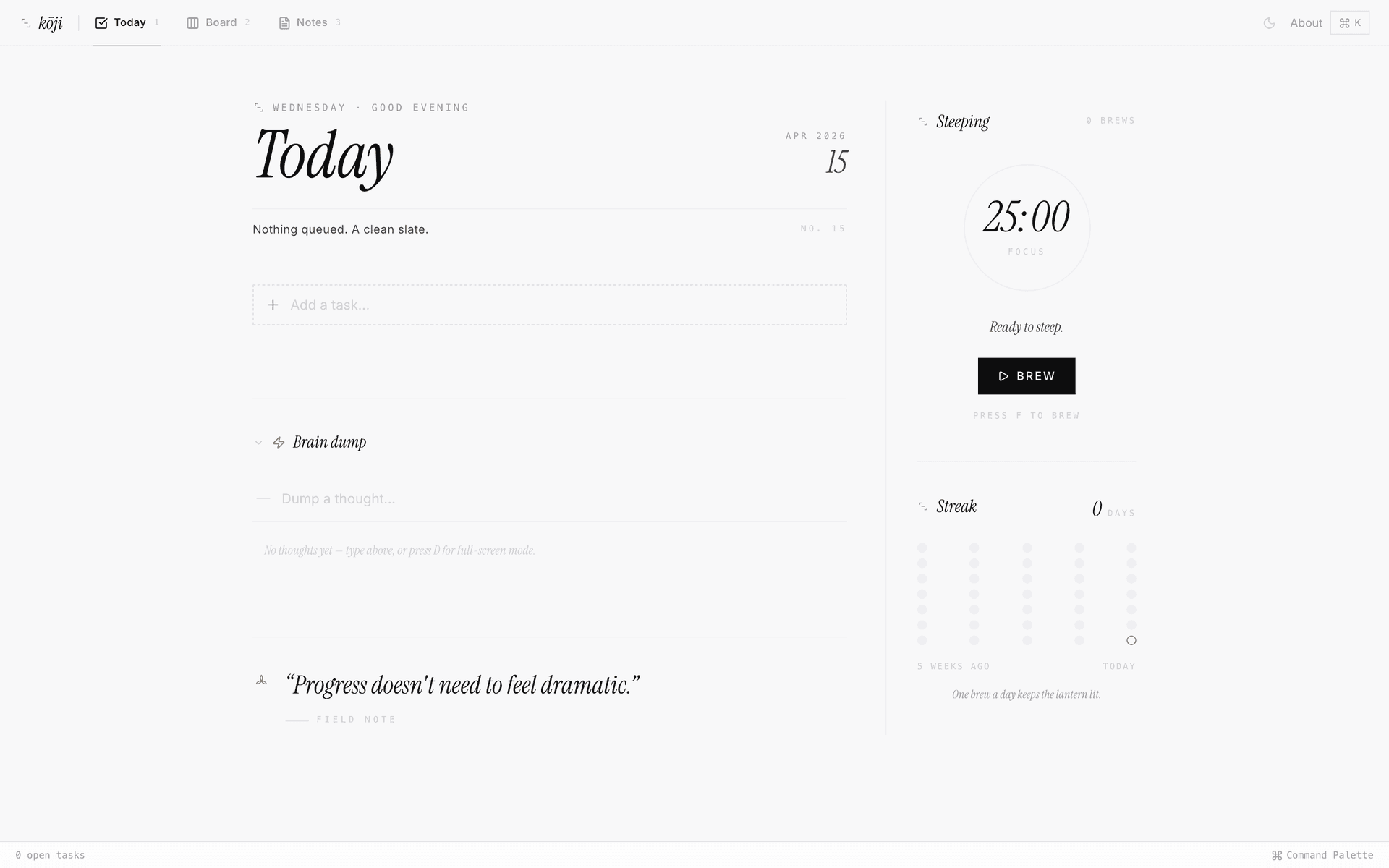
Kōji started because nothing else worked the way my brain does. I think in bursts — a random idea at 2am, a task mid-conversation, a note that connects to something from three days ago. Every tool either forced me into someone else's workflow or was so bloated that organising took longer than doing. So I built my own.
Shortcuts40+
Views3 modes
Cloud deps0
THE CHALLENGE
I tried everything — Notion, Todoist, Linear, Apple Notes, random text files. Nothing matched how I actually work. The core problem wasn't feature gaps, it was friction.
Capturing a thought should take less than a second. Switching between task views should be a single keystroke. Writing long-form notes should feel like a writing tool, not a database with a text field.
And none of it should require an internet connection or a login wall. I needed something that gets completely out of the way.
- Zero-friction capture — thought to task in under a second
- Single-keystroke view switching, no mouse required
- A real writing experience for long-form notes
- Fully offline — no accounts, no sync, no login walls
THE APPROACH
Kōji is built around three views that mirror how I actually think. Today shows what needs to happen right now — a clean, focused task list with inline editing, drag-to-reorder, and priority markers. Board gives the bigger picture with draggable lanes and batch actions. Notes is where longer thinking lives, with a full markdown editor, pinning, and search.
Brain Dump mode is the secret weapon. Press D anywhere for a full-screen, distraction-free overlay. Type a thought, hit Enter, repeat. Sort it into tasks later or let it sit — the capture happens in zero friction.
The design follows an editorial philosophy: warm monochrome palette with a single gold accent (#C9A063), Cormorant Garamond headings, and careful typographic hierarchy. A custom SmoothCaretInput makes the cursor glide between characters so capture feels physical, not digital. A built-in Pomodoro focus timer, Cmd+K command palette, and 40+ platform-aware keyboard shortcuts complete the system. All data lives in IndexedDB on the user's device — no accounts, no API calls, no cloud round-trips.
- Three views: Today, Board, and Notes
- Brain Dump mode — full-screen instant capture overlay (D key)
- Built-in Pomodoro focus timer with persisted streak counter
- Cmd+K command palette + 40+ keyboard shortcuts, Mac and Windows aware
- 100% local-first — IndexedDB, no accounts, no cloud
TECH STACK
Next.jsTypeScriptLocal-firstProductivityEditorial Design
RESULTS
The impact
3Core Views
40+Keyboard Shortcuts
0msCloud Latency
100%Offline Capable